Handyman software that keeps small jobs from slipping through.
Keep the scope, job details and invoices connected, on your phone or computer. For solo operators and crews. Starting at $29/mo.


Lead Button
Turn website visits into quote requests.
Add a “Get a free quote” button to your website. Requests land in Field on desktop and mobile. With notifications on, Field sends a phone alert when a request comes in.
Start with FieldSet it up in Settings → Website button. On the free plan, leads over your request limit need an upgrade to reveal contact details.
Your website
A visitor taps Get a free quote and sends a request.
Field desktop
The request appears in the Requests list.
Field mobile
New website requestTap the alert to open the request.
The faucet is fixed. The next address is calling.
When several small jobs fill the day, the work details and unfinished invoices can end up scattered across messages. Follow the work from quote to job to invoice in Field.
Your whole day, in one place.
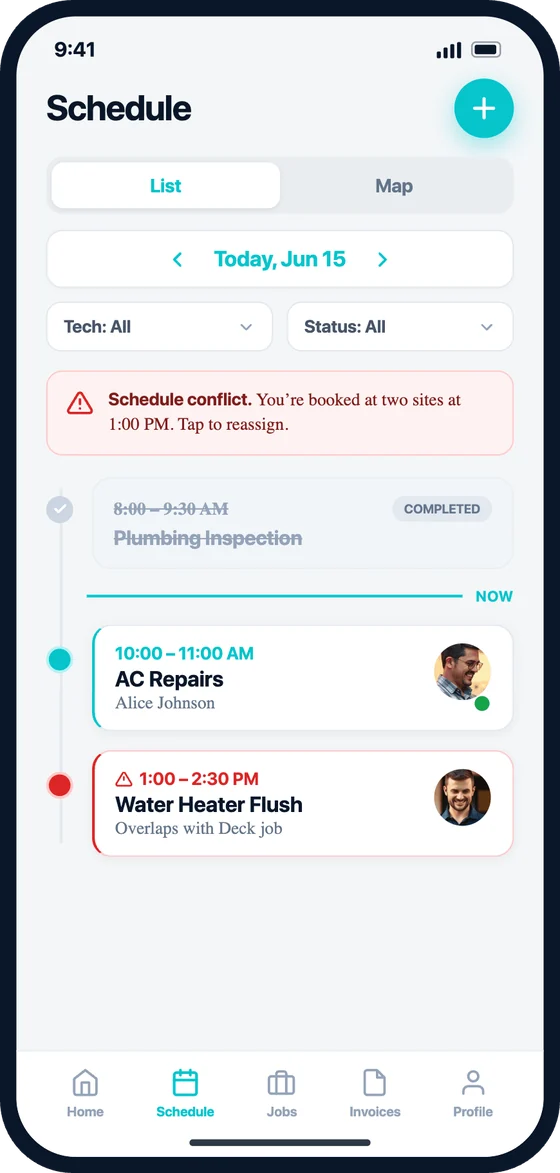
See the team, every job and what’s paid as the day happens.
Your day on the map.
Every job pinned, so you can order the day by distance.
From first call to paid.
One job carries through from quote to invoice, and customers pay your own Stripe.

Put the agreed work in one quote.
Repairs, materials and hours: add the line items for this customer. When the quote becomes a job, its details carry forward.
Keep the work and the instructions together.
The punch list, customer instructions and progress notes belong with the job. See the schedule; assign a team member on Pro and up.

Carry the details into the invoice.
The job’s line items carry onto the invoice. Edit what changed, add photos if useful, and send by email or text. See paid, unpaid and past-due invoices in one list.
Actual Field screens. The same workflow supports different trades; the scope and job notes are yours.
Work on your own. Bring the crew when you need to.
Start with one customer and one job. Give each assigned team member the details they need as your team grows.
- Solo: Starter gives one user quotes, jobs, invoices and customer records.
- With a crew: Pro and up add team scheduling, dispatch and permissions.
- On the job: Keep notes, photos and scope updates with the assigned work.
See Field work, one short video at a time.
Real Field screens with sample data. Start with a quote, then pick the next step.
Send a quote and turn it into a job · 1:04 · Read the steps
 Create and schedule a job1:08 video
 Send an invoice and record a payment0:49 video
 Get paid by card1:15 video
 Add a technician1:14 video
 Check and fix a timesheet1:15 video
 Find your crew on the map0:56 video
See who's closest to the next call.
Type the customer's address. Field lists your crew by distance, nearest first, from where each person last started or finished a visit.

- Closest firstStraight-line miles from each person's last visit to the address you typed, with the nearest person at the top.
- Who's workingSee who just finished a visit next to their spot on the map, and who's on the clock when time tracking is on.
- Call from the mapTap a person to call them or see their visits, then send the closest one.
On Business and up. Spots come from visits your crew starts and finishes in Field. Field doesn't track phones in the background.
Know who worked, and for how long.
Your crew clocks in on the Field app or on the web. On Monday you open last week and see each person's hours, ready to approve and download.
- Clock in on the jobClock in and out from a phone or a computer, and pause for a break in the app. The clock follows each visit, so you can see how long each job took.
- Timesheets you approveEveryone's week in hours and minutes, with time over 40 hours shown. Fix a missed punch with a reason, approve the week and download a CSV for payroll.
- Pay and performanceSet each person's rate to see their estimated pay for the pay period, and what each person's jobs billed for the hours they put in.

Time tracking is on Pro and up; pay and performance on Business and up. Turn it on in Settings, under Time tracking. Pay is an estimate before taxes and deductions; Field doesn't run payroll or pay your crew. Location at clock in and out is off unless you turn it on.
Handyman software questions, answered.
Is Field suitable for a solo handyman business?
Yes. Starter is for one user. Pro supports up to 5 users and adds team scheduling and dispatch. You can start with your own jobs and add a team when you need one.
What is free to start?
Your first 3 quotes, jobs, invoices and customers are free. No card is needed to start. When you reach the free allowance, choose a paid plan; plans start at $29/mo.
Can I use it on my phone and computer?
Yes. Use Field in your browser or download the iPhone or Android app. Your account works across web and mobile.
What happens when the scope changes?
Edit the line items as the work changes. Quote details carry into the job and invoice; you can add, update or remove items at each stage.
Can I import customers or connect QuickBooks?
Yes. Export your customer list from your current software or a spreadsheet as a CSV or Excel file and upload it to Field. Match the columns and check every row before anything is added; duplicates are skipped, and you can download any rows that need fixing. Each customer needs an address, and the free plan’s customer limit still applies. QuickBooks sync is not available yet.
How do my customers pay me?
By card, through your own Stripe account, so payments go straight to you. AllBetter never touches or holds your money, and you pay Stripe’s standard card fees directly to Stripe. Send a pay link with the invoice; unpaid invoice PDFs also carry a “Pay online” button and a QR code to scan. Your customer pays on a simple web page, with no app or account needed. Field marks the invoice paid, emails your customer a receipt and emails you a payment notice. ACH and bank transfers are not offered.
Does Field send emails or texts for me?
You send quotes and invoices from your own email or text app; Field builds the PDF and the pay link for you. Field itself emails your customer a receipt when they pay online, emails you a payment notice, and sends you an email and a phone alert when a request comes in from your website quote button. Field doesn’t send texts. On Pro and up, it can email your client one reminder on the invoice’s due date if you turn it on; it doesn’t send other follow-ups.
Can customers request a quote from my website?
Yes. Field gives you a “Get a free quote” button for your own website, as a code, a link or a QR code. Requests land in Field, and you get a notification in the app, an email and a phone alert. You can send yourself a test lead to check it works. On the free plan, extra requests still arrive, but the sender’s details stay hidden until you pick a plan. Field doesn’t find customers for you; the requests come from your own website.
Can I drag jobs on the schedule or add them to my calendar?
Yes, on the web. Drag a visit to a new day or time in the Week or Month view and confirm once; double-booked visits show in red. Moving a visit doesn’t notify your customer. You can also add your visits to Google, Apple or Outlook Calendar with a private link: owners see every visit, technicians see their own. The calendar link is one-way and is set up on the web for now.
Can my crew clock in and out?
Yes, on Pro and up. Your crew clocks in and out on the Field app or the web, pauses for a break in the app, and the clock follows each visit. Timesheets shows everyone's week in hours and minutes, with time over 40 hours marked (federal weekly rule; check your state's rules). Edit or add missed time with a reason, approve the week and download a CSV. On Business and up, set a rate for each person to see estimated pay for the pay period, before taxes and deductions. Field doesn't run payroll. Location at clock in and out is off unless you turn it on.
Does Field create automatic recurring invoices?
No. Each invoice is sent from its job. Field does not provide automatic recurring billing.
Choose the plan for the team you have today.
Month to month. Your first 3 quotes, jobs, invoices and customers are free. No card to start.
Starter
- Quotes, jobs and invoices
- Customer records (CRM)
- Your own Stripe for payments
- Web and mobile
Pro
- Everything in Starter
- Add technicians and dispatch visits
- Each technician's day on their phone
- Time clock and timesheets
- Invoice payment reminders
Business
- Everything in Pro
- Team Map: who's closest to the next job
- Pay estimates
- Performance
- Invoice payment reminders
Enterprise
- Everything in Business
- Room for 20 people
- Invoice payment reminders
Your first stepsCreate an account. Add a customer. Build a quote or add your next job. No need to move every record before you begin.
Need a walkthrough? Schedule a demoPut your next handyman job in Field.
Start with one customer and one job. Keep the details together from there.
First 3 invoices on us · starting at $29/mo after your free allowance