


Don’t want to DIY? Skip the lead-gen markup — post the job on AllBetter and get ID-verified bids in minutes. $0 lead fees, Escrow Shield on every transaction.
Looking for more jobs? Stop paying for leads. On AllBetter, homeowners post jobs and you bid direct — $0 lead fees, ever.
Get jobs on AllBetter →Find the right professional for your project with our guide to the best apps for finding contractors.
Check your inbox for a confirmation email.
Booking subcontractors directly instead of through a general contractor can save homeowners 15–30% on renovation costs — but only if you have identity-verified pros and Escrow Shield payment protection standing between your money and an unverified stranger. The general contractor markup exists for a reason. When you remove the middleman, you inherit the middleman’s responsibilities: scheduling, vetting, quality control, and payment management. The savings are real. The risks are equally real. Contractors can join AllBetter (a newer platform) as a provider to receive verified leads with $0 lead fees.
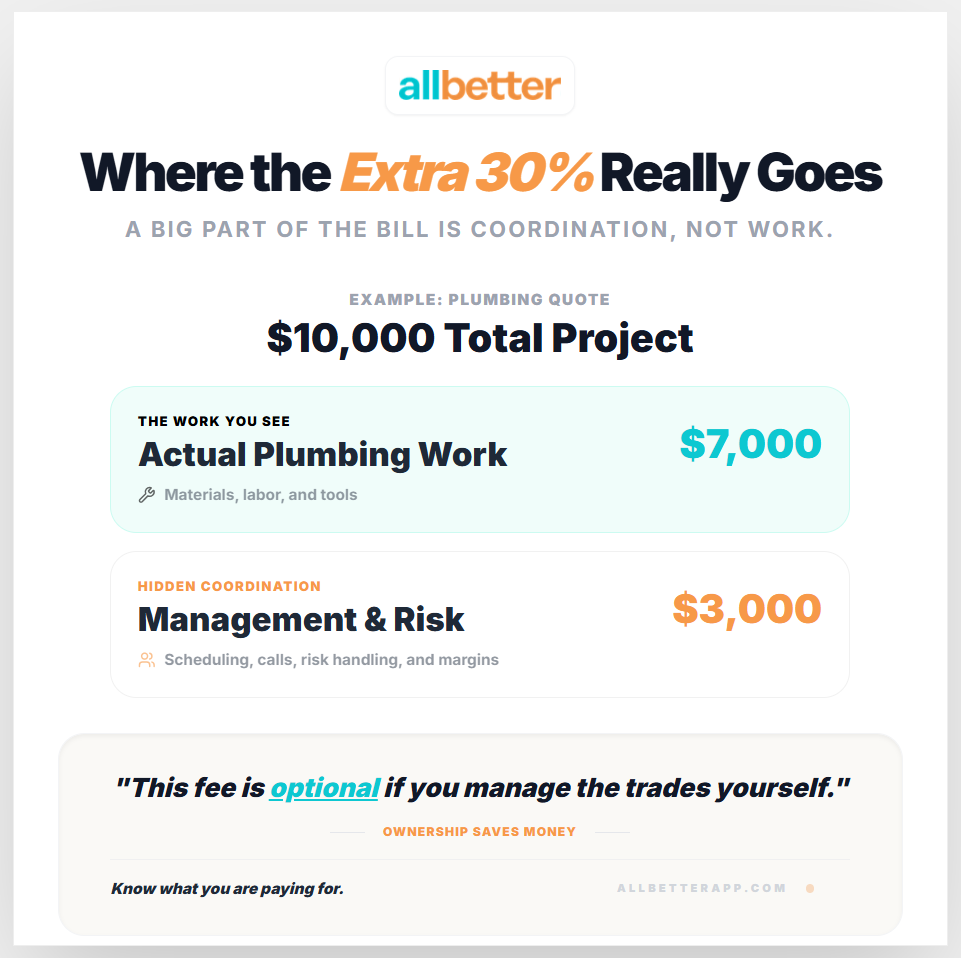
Where the General Contractor Markup Actually Goes
Skipping the DIY route? You can post the job on AllBetter and have Stripe-verified pros bidding within the hour — no lead fees, no spam calls, payment held in escrow until you approve the work.
A general contractor typically adds 15–30% on top of every subcontractor’s bid. On a $40,000 kitchen renovation, that is $6,000–$12,000 in markup. Homeowners see this number and understandably ask: what am I paying for?
The markup covers three things: project management (scheduling and coordinating multiple trades), liability absorption (the GC is responsible if something goes wrong), and vetting (the GC has established relationships with subcontractors they trust). When you book subcontractors directly, you save the markup — but you take on all three of those responsibilities yourself.
The question is not whether you can save money. You absolutely can. The question is whether you have the tools and protections to manage the risk that comes with those savings.
The Real Math: General Contractor vs. Direct Booking for Homeowners
Understanding where your money goes makes the decision concrete rather than theoretical.
| Cost Element | With General Contractor | Booking Directly |
|---|---|---|
| Plumbing rough-in | $4,500 (sub bid) + $900 markup | $4,500 (you pay sub directly) |
| Electrical | $3,200 + $640 markup | $3,200 |
| Cabinet installation | $2,800 + $560 markup | $2,800 |
| Tile work | $3,500 + $700 markup | $3,500 |
| Painting | $2,000 + $400 markup | $2,000 |
| Total | $19,200 | $16,000 |
| Savings | — | $3,200 (17%) |
That money only stays in your pocket if every subcontractor shows up on schedule, does quality work, and gets paid without disputes.
One missed handoff between trades can cost more than the markup you saved.
How Platforms Like Thumbtack and Angi Handle Subcontractor Booking
If you are going to book subcontractors directly, you need to understand how the major platforms facilitate — or complicate — that process.
Thumbtack
Thumbtack connects homeowners with individual contractors through a lead-based system. You post a project, receive bids from multiple pros, and select one. The platform charges contractors per lead ($15–$75), which means the pros who respond are already absorbing a marketing cost. Thumbtack works well for finding individual subcontractors, but it offers no payment protection, no escrow, and no coordination between multiple trades. If you need a plumber, electrician, and tile installer for the same renovation, you are managing three separate relationships with no safety net between them.
Angi
Angi provides a marketplace of reviewed professionals with optional advertising tiers. The review system is mature and helps with vetting, but the platform’s lead-sharing model means your project request goes to multiple contractors simultaneously. For subcontractor-level work, Angi can surface qualified tradespeople in specific categories. The limitation is the same as Thumbtack: no payment protection, no escrow mechanism, and no way to coordinate multiple subcontractors working on the same project through the platform itself.
TaskRabbit
TaskRabbit operates on a task-based model where you select from available professionals and pay a 15% service fee on completed work. The platform is well-suited for small, standalone tasks — assembling furniture, mounting TVs, minor repairs. For multi-trade renovation projects that require licensed subcontractors working in sequence, TaskRabbit’s task-by-task structure creates friction. Each trade is a separate booking with no project-level coordination, and the 15% platform fee on each task can quickly offset the savings you gained by skipping a general contractor.
Nextdoor
Nextdoor leverages neighborhood recommendations to surface local service providers. The trust signal from neighbor endorsements is genuinely valuable when vetting subcontractors. However, Nextdoor has no built-in payment system, no identity verification, and no project management tools. You are essentially finding names through a social network and managing everything else — contracts, payments, scheduling, dispute resolution — completely on your own.
Protection Reality Check: Booking Subcontractors With vs. Without a Safety Net
Ready to fill your schedule? Join AllBetter and pick up local jobs near you — no lead fees, payment protection built in.
Get jobs on AllBetter →| Without Protection | With AllBetter |
|---|---|
| No identity verification — you trust a stranger’s word about their credentials | Every pro is Stripe Identity-verified before they can bid on your project |
| Upfront payments with no guarantee of completion | Escrow Shield holds funds until you approve the completed work |
| Verbal agreements that cannot be enforced | In-app scope of work documentation creates a binding project record |
| No recourse if a subcontractor disappears mid-project | Dispute resolution process with full communication trail |
| You chase payments, receipts, and proof of insurance manually | Verification, communication, and payment all managed in one platform |
| No coordination between multiple trades | Single platform tracks all subcontractors on one project timeline |
See also the best contractor apps, growing with subcontractors, and maximizing profitability.
Ready to save the markup without the risk?
Post a project free on AllBetter — get verified bids from identity-checked subcontractors with Escrow Shield protecting every dollar.
The Correct Sequence: Scheduling Subcontractors Without Costly Mistakes
When a general contractor coordinates a renovation, they know the construction sequence by heart. Most homeowners do not. Booking subcontractors in the wrong order creates cascading delays and rework costs that can exceed $5,000 on a mid-size project.
For a typical kitchen or bathroom renovation, the correct trade sequence is:
- Demolition — Remove existing fixtures, cabinets, flooring, drywall as needed
- Structural work — Any wall modifications, beam installations, or framing changes
- Rough plumbing — Supply lines, drain lines, gas lines repositioned before walls close
- Rough electrical — New circuits, outlet locations, lighting boxes installed before drywall
- HVAC modifications — Ductwork changes must happen while walls are open
- Insulation and drywall — Walls closed after all rough-in work passes inspection
- Tile and flooring — Installed before cabinets so the floor runs underneath
- Cabinet installation — After flooring, before countertops
- Countertop templating and installation — Requires finished cabinets in place
- Finish plumbing and electrical — Fixtures, outlets, switches installed last
- Painting and final trim — Touch-ups after all trades are complete
If your electrician arrives before demolition is complete, they are billing you to wait. If your tile installer starts before the plumbing rough-in passes inspection, you may need to tear out tile to fix a failed pipe. Each mistake compounds.
Vetting Subcontractors: The Five Checks You Must Do Yourself
A general contractor vets subcontractors through years of working relationships. When you book directly, you need a systematic process to replace that institutional knowledge.
1. License verification. Check your state’s contractor licensing board website. Every licensed subcontractor has a searchable record that shows license status, expiration date, and any disciplinary actions. If they cannot provide a license number, stop the conversation.
2. Insurance confirmation. Request a Certificate of Insurance (COI) directly from their insurance provider — not from the contractor. A COI from the contractor could be outdated or falsified. You need general liability coverage ($1M minimum) and workers’ compensation if they have employees.
3. Reference checks. Ask for three references from projects completed in the last 12 months. Call each reference. Ask specifically: did they finish on time, did the final cost match the bid, and would you use them again? If they cannot provide recent references, that is a red flag.
4. Scope of work documentation. Never start work without a written scope that specifies: exactly what work will be performed, materials to be used (brand and grade), project timeline with milestones, payment schedule tied to milestones, and what happens if changes are needed. A detailed scope protects both parties.
5. Identity verification. Platforms like AllBetter verify every contractor’s identity through Stripe Identity before they can bid on projects. If you are booking outside a verified platform, you are trusting a stranger’s self-reported credentials without independent confirmation.
When Booking Subcontractors Directly Makes the Most Sense
Direct booking is not right for every project. It works best when the scope is contained and the trade sequence is simple.
Good candidates for direct booking:
- Single-trade projects (one bathroom re-tile, one electrical panel upgrade, one exterior paint job)
- Projects under $10,000 where the GC markup would be $1,500–$3,000
- Repeat maintenance work where you have an established relationship with a trusted pro
- Projects where you have construction knowledge and can manage the timeline yourself
Better suited for a general contractor:
- Multi-trade renovations involving 4+ subcontractors working in sequence
- Structural modifications requiring engineering review and permits
- Projects over $50,000 where coordination errors compound quickly
- Historic homes or specialty work requiring trades with niche expertise
Hire an ID-verified home services pro — without the lead-gen markup
| Feature | Angi / Thumbtack / HomeAdvisor | AllBetter |
|---|---|---|
| Pro Identity Verified | Self-attested, no verification | Stripe Identity verification on every pro |
| Lead Fees to Pros | $15–$80 per lead (passed back to homeowner) | $0 lead fees — ever |
| Payment Protection | None — you pay direct, hope for the best | Escrow Shield — you only release payment when work is approved |
| Pro Quality Filter | Anyone can sign up; reviews come later | ID-verified pros, average 3+ bids per job |
| Spam & Auto-Calls | Your phone rings for days after one inquiry | Zero spam — pros message in-platform |
Lead-fee context: home services leads on traditional platforms run $20-$80 each — that markup gets baked into your quote.
DIY-ing home services work without an ID-verified pro can turn a $200 fix into a $2,000 do-over — and the quality issues only show up months later. The safer move is to post the job on AllBetter — you get ID-verified bids in minutes, no obligation.
No payment until you approve the work. Escrow Shield protects every transaction.
Frequently Asked Questions
How much can I save by booking subcontractors directly instead of using a general contractor?
Most homeowners save 15–30% by eliminating the general contractor markup. On a $30,000 renovation, that translates to $4,500–$9,000 in savings. The actual amount depends on how many trades are involved and whether you can manage the project timeline effectively to avoid rework costs.
Is it legal to book subcontractors directly without a general contractor?
Yes, homeowners can legally book subcontractors directly for work on their own property in all 50 states. However, you become responsible for ensuring each subcontractor is properly licensed, insured, and that all work meets local building codes. Some municipalities require a general contractor for projects above certain dollar thresholds or involving structural changes.
What is the biggest risk of managing subcontractors myself?
The biggest risk is a payment dispute with no recourse. If you pay a subcontractor upfront and they deliver poor work or abandon the project, recovering that money through legal channels costs more than the original payment. Using a platform with Escrow Shield protection — where funds are held until you approve the work — eliminates this risk entirely.
How does AllBetter help homeowners who want to book subcontractors directly?
AllBetter provides the safety infrastructure that replaces what a general contractor normally handles: every subcontractor is Stripe Identity-verified, Escrow Shield holds payment until you approve completed work, all communication and scope documentation lives in the app, and dispute resolution is available if issues arise. You get the direct-booking savings without the direct-booking risk.
Should I get multiple bids when booking subcontractors directly?
Always get at least three bids for each trade. Compare not just price but scope detail, timeline, payment terms, and insurance coverage. The lowest bid is not always the best value — a subcontractor who bids low and then adds change orders during the project will cost more than one who bids accurately upfront. AllBetter lets you compare verified bids side-by-side with full transparency.
According to BLS — Occupational Outlook Handbook, BLS: home services demand continues to grow; quality + identity verification are the homeowner’s only baseline filters.
More AllBetter resources:
Skip the DIY Risk
Don’t risk paying twice because the first contractor wasn’t checked out.
Post your job on AllBetter today. You don’t pay a dime until a Stripe-verified pro shows up, you approve in-app, Escrow Shield releases payment — backed by Escrow Shield.
Stripe-verified pros · $0 lead fees · Escrow Shield protection