

The National Association of Home Builders reports that homeowner spending on maintenance and repairs averages $3,000–$5,000 per year — and the biggest cost is often not the repair itself but the time spent finding a reliable contractor, vetting their credentials, and managing the payment process. According to BrightLocal, 87% of consumers research service providers online before booking, yet most home service platforms leave homeowners without any payment protection once the contractor is selected and paid.
On AllBetter
Need a local pro?
Post the job free and compare bids from identity-verified local pros — payment held in escrow until the work is done right.
Find a verified pro near you →Average annual homeowner spending on maintenance and repairs (NAHB)
Of consumers research service providers online before booking (BrightLocal)
Lead fees charged to contractors on AllBetter — bids reflect real project costs
How do you get the most out of AllBetter as a homeowner or contractor? AllBetter combines three features that set it apart from other home service platforms: escrow-protected payment that holds your money until you approve the completed work, a competitive bidding system where 3–5 verified contractors compete for your project, and Stripe Identity verification for every user on the platform. Getting the best results requires understanding how each feature works and using them strategically.
This guide walks through the complete AllBetter process — from posting your first project to selecting a contractor, managing communication, and using escrow to protect your investment — with practical advice for both homeowners and service professionals.

Step 1 — Post Your Project With Clear Scope
Skipping the DIY route? You can post the job on AllBetter and have ID-verified pros bidding in about 10 minutes — no spam calls, payment held in escrow until you approve the work.
The quality of bids you receive depends directly on how clearly you describe the project. AllBetter’s posting system lets you specify the type of work — plumbing, electrical, handyman, cleaning, HVAC, painting, or any other home service — along with your budget range, timeline, and specific requirements.
Effective project posts include three elements: what needs to be done (scope), when it needs to happen (timeline), and any constraints the contractor should know about (property access restrictions, specific material preferences, HOA requirements, or permits required). The NAHB recommends documenting project scope in writing before engaging any contractor — AllBetter’s posting system builds this documentation directly into the process. For guidance on structuring project scope effectively, see how estimates and contracts work.

Step 2 — Evaluate Competing Bids Strategically
After posting, you receive 3–5 bids from Stripe Identity-verified contractors. Because AllBetter charges contractors no fee to bid, these bids reflect actual project costs rather than inflated quotes designed to cover platform expenses. The NFIB reports that contractors on lead-fee platforms charge 10–25% more per project to recoup platform costs — a markup that is invisible to homeowners but built into every estimate.
Hidden markup that contractors on lead-fee platforms add to every quote to cover platform costs (NFIB) — a cost AllBetter eliminates entirely with a pay-when-you-win bidding model.
When comparing bids, evaluate three factors beyond price: the contractor’s verified project history, their customer reviews, and how specifically they address your project requirements. A lower bid from a contractor with no reviews carries more risk than a moderately priced bid from someone with a documented track record of similar work. Understanding the hidden costs of homeownership includes recognizing that the cheapest contractor is not always the most cost-effective choice.
Step 3 — Use In-App Communication for Everything
AllBetter’s in-app messaging system keeps all project communication in one thread. This is not a convenience feature — it is a protection mechanism. If a dispute arises about scope, pricing, or timeline, the in-app record provides documented evidence of what was agreed to. The SBA recommends maintaining written records of all contractor communications, and AllBetter’s system does this automatically.
Use the messaging system for scope changes, timeline adjustments, and any agreements about materials or pricing that differ from the original bid. Moving conversations to text messages or phone calls creates gaps in the documented record that make dispute resolution more difficult.
Step 4 — Understand How Escrow Protects Your Payment
Watch: how escrow holds the money until you approve the work (22 seconds).
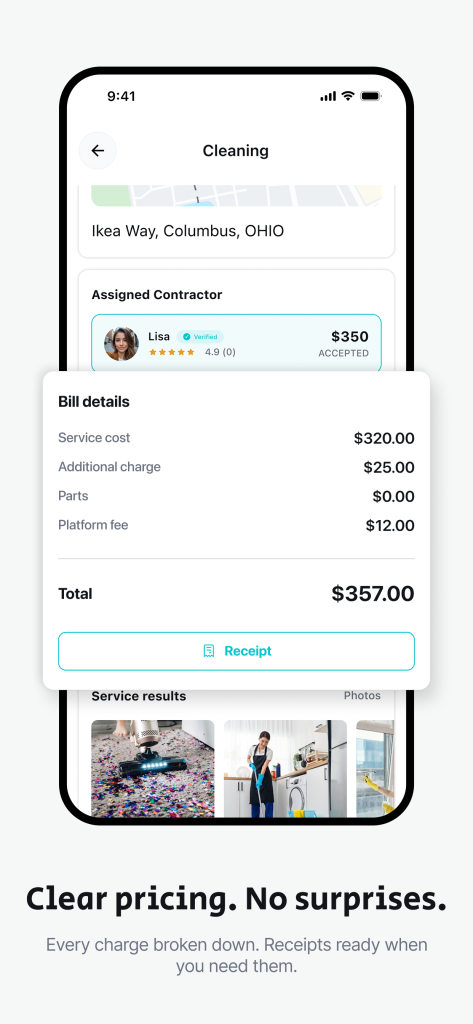
Escrow-protected payment is AllBetter’s most significant feature. When you accept a contractor’s bid, your payment is held in a secure third-party account managed through Stripe. The contractor knows the funds are committed — which motivates them to complete quality work on time — but the money does not reach them until you confirm the project is complete and satisfactory.
This protection works both ways. Contractors arrive knowing the payment is secured. They do not need to worry about collecting after the project or chasing unpaid invoices. The BLS reports that independent contractors spend 25–30% of their work week on non-billable administrative tasks, and payment collection is one of the most time-consuming. Escrow eliminates that overhead entirely. For a deeper explanation of why upfront payments are risky, see why you should never pay a contractor upfront.
Step 5 — Review and Approve the Completed Work
On AllBetter
Ready to get it done?
Fund escrow before work starts. Release payment when you approve the finished work.
Find a verified pro near you →When the contractor finishes, you review the work against the original scope. If everything meets the agreed-upon standards, you approve the project in the app and escrow releases the payment to the contractor immediately. There is no 30-day invoicing cycle, no check in the mail, and no follow-up required from either party.
If the work does not meet the agreed scope, AllBetter’s resolution team mediates the dispute. They review the documented scope of work, the complete in-app communication thread, and any photos or notes attached to the project by either party. The escrow system ensures that funds remain fully protected during this resolution process — the homeowner’s money stays secure in the escrow account, and the contractor has comprehensive documentation of what was completed and communicated.
Tips for Contractors — Maximizing Your AllBetter Profile
For service professionals on AllBetter, the platform operates fundamentally differently from traditional lead-fee services. You do not pay to receive project notifications or submit bids. You compete on merit — your verified credentials, documented project history, and accumulated customer reviews — and you pay only when you actually win work.
Three practices consistently improve contractor performance on AllBetter:
- Respond to project posts quickly — homeowners often select from the first 3–5 bids they receive. Faster response increases visibility.
- Write specific bids — reference the homeowner’s exact requirements rather than sending generic templates. Specificity demonstrates that you read and understood the project scope.
- Maintain your review history — the BrightLocal survey reports that 78% of consumers trust online reviews as much as personal recommendations. Each completed project with a positive review strengthens your conversion rate on future bids.
For contractors managing their business operations, AllBetter Field handles quotes, jobs, invoicing and payment collection, with team scheduling on Pro and up. Inbound project opportunities come through the separate JobPro app. For strategies on growing a contracting business, see the guide to earning more as a service professional.
Where AllBetter Works Best — And Where It Does Not
AllBetter is designed for project-based skilled trades work: plumbing, electrical, HVAC, handyman services, cleaning, painting, roofing, landscaping, and general home improvement. The competitive bidding system and escrow protection are most valuable for projects with defined scopes and clear completion criteria.
Verified professionals on AllBetter — every one confirmed through Stripe Identity with a government-issued ID.
The platform’s network of 27,000+ independent pros is smaller than HomeAdvisor/Angi (200,000+). For highly specialized trades in smaller markets, the larger platforms may offer more options. For general tasks like furniture assembly or errands, task-based platforms like TaskRabbit may be a better fit. For a full platform comparison, see AllBetter vs HomeAdvisor vs Thumbtack vs Angi.
Ready to Get Started?
Post your project for free, receive 3–5 competing bids from verified contractors, and pay only when you approve the completed work — protected by escrow every step of the way.
Hire an ID-verified home services pro — without the lead-gen markup
| Feature | Angi / Thumbtack / HomeAdvisor | AllBetter |
|---|---|---|
| Pro Identity Verified | Self-attested, no verification | Stripe Identity verification on every pro |
| Lead Fees to Pros | $15–$80 per lead (passed back to homeowner) | only pay when you win — ever |
| Payment Protection | None — you pay direct, hope for the best | Escrow Shield — you only release payment when work is approved |
| Pro Quality Filter | Anyone can sign up; reviews come later | ID-verified pros, average 3+ bids per job |
| Spam & Auto-Calls | Your phone rings for days after one inquiry | Zero spam — pros message in-platform |
Lead-fee context: home services leads on traditional platforms run $20-$80 each — that markup gets baked into your quote.
DIY-ing home services work without an ID-verified pro can turn a $200 fix into a $2,000 do-over — and the quality issues only show up months later. The safer move is to post the job on AllBetter — you get ID-verified bids in minutes, no obligation.
Your money sits in escrow and is released only when you approve the work.
Frequently Asked Questions
Is AllBetter free for homeowners?
Yes. Posting a project, receiving bids, and using the in-app messaging system is free for homeowners. When you book, a small service fee applies — always shown at checkout before you confirm — covering escrow protection, identity verification, and support. Pros pay a small fee only when they win a job and the invoice is paid, and AllBetter Field, the separate business software, is a subscription — never by charging you hidden fees or selling your information as a lead.
How many bids will I receive on AllBetter?
Most projects receive 3–5 competing bids from Stripe Identity-verified contractors. The number of bids depends on your location, project type, and budget range. Projects in major metro areas with common service categories (plumbing, electrical, cleaning) typically receive bids within hours of posting.
What happens if I am not satisfied with the completed work?
If the completed work does not meet the agreed scope, you can request resolution through AllBetter’s mediation process. Your payment remains in escrow — protected and secure — while the resolution team reviews the documented scope, in-app communication, and project records. If the dispute has merit, AllBetter works with both parties to reach a fair resolution.
How does AllBetter verify contractors?
Every contractor on AllBetter completes Stripe Identity verification using a government-issued ID. This is a higher standard than most competing platforms, which often rely on self-reported license numbers or basic background checks. You can view a contractor’s verification status, completed project history, and customer reviews directly on their profile before accepting a bid.
Can contractors use AllBetter without paying lead fees?
Yes. AllBetter charges contractors no fee to bid — no cost to receive project notifications, view project details, or submit bids. Contractors pay only when they win a project. This model differs from HomeAdvisor ($15–$100/lead) and Thumbtack ($5–$20/lead), where contractors pay regardless of whether they win the work.
Does AllBetter have an app for contractors?
AllBetter Field is the contractor-facing mobile app. It combines scheduling, customer communication, invoicing, and payment collection straight to your own Stripe account — integrated with AllBetter’s homeowner marketplace. It starts at $29/month compared to Jobber ($69/month) and Housecall Pro ($79/month), with a free trial for contractors starting out.
What types of home services does AllBetter cover?
AllBetter covers skilled trades and home services including plumbing, electrical, HVAC, handyman services, house cleaning, painting, roofing, landscaping, and general home improvement projects. The platform is designed for project-based work with defined scopes where escrow protection and competitive bidding provide the most value to both homeowners and contractors.
More AllBetter resources: