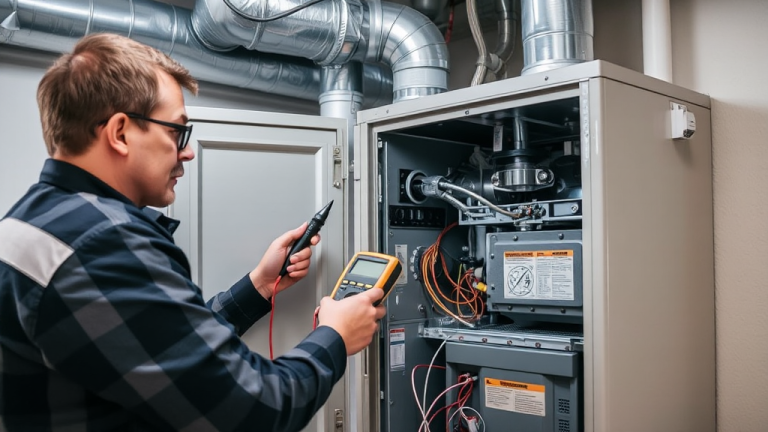


Home service businesses that rely on manual scheduling, paper dispatching, and phone-based coordination lose an average of 20 hours per week to administrative tasks, according to a 2024 Deloitte analysis of small business operations. For a company with five field technicians, that wasted time translates to $25,000-$40,000 per year in lost productivity. Workforce automation eliminates these bottlenecks by replacing manual processes with software that schedules, dispatches, tracks, and reports on field operations in real time.
On AllBetter
Need a local pro?
Post the job free and compare bids from identity-verified local pros — payment held in escrow until the work is done right.
Find a verified pro near you →Lost to manual admin tasks
Wasted on lost productivity
Average productivity increase with automation
Reduction in drive time between jobs
What is workforce automation in home services? Workforce automation in home services uses software and AI to handle scheduling, dispatching, route optimization, time tracking, and reporting for field service teams. It replaces manual spreadsheets, phone calls, and paper-based systems with centralized digital platforms that coordinate technicians, appointments, and customer communication automatically.

Why Home Service Businesses Need Workforce Automation in 2026
Skipping the DIY route? You can post the job on AllBetter and have ID-verified pros bidding in about 10 minutes — no spam calls, payment held in escrow until you approve the work.
The home services industry is growing faster than the workforce to support it. The Bureau of Labor Statistics projects 340,000 new home service positions by 2032, but the skilled trades gap is widening. Businesses cannot solve the labor shortage by simply finding more workers. They need each existing worker to be more productive.
The real cost of manual operations
Manual scheduling and dispatching create compounding inefficiencies that most business owners underestimate:
- Double-bookings and scheduling conflicts lead to missed appointments, costing $150-$300 per incident in lost revenue and customer trust.
- Unoptimized routing wastes 30-45 minutes per technician per day in unnecessary windshield time, according to the International Facility Management Association (IFMA).
- Paper-based time tracking enables timecard errors that inflate payroll by 3-5% on average.
- Delayed invoicing extends accounts receivable cycles by 15-30 days, choking cash flow for small operators.
Average productivity loss for a 5-technician home service company relying on manual operations (Deloitte, 2024)
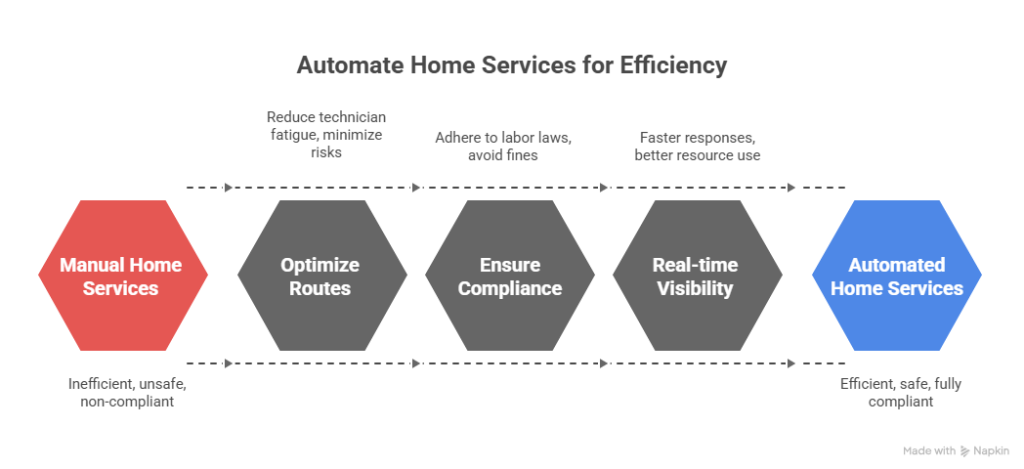
Automation addresses each of these with precision. Scheduling software prevents conflicts automatically. GPS-integrated dispatching assigns the nearest qualified technician to each call. Digital time tracking captures clock-in and clock-out data without manual input. Automated invoicing generates and sends bills the moment a technician marks a task complete.
Workforce Automation Software: Feature Comparison for Home Service Businesses
The market for field service management software ranges from $29/month platforms built for solo operators to $500+/user/month enterprise systems. Choosing the right tier depends on your team size, service volume, and growth trajectory.
| Feature | Basic Tier ($29-$69/mo) | Mid Tier ($69-$200/mo) | Enterprise ($200-$500+/mo) |
|---|---|---|---|
| Scheduling | Calendar-based, manual assignment | Drag-and-drop with conflict alerts | AI-optimized auto-assignment |
| Dispatching | Basic notifications | GPS routing, real-time tracking | Predictive dispatch with demand forecasting |
| Invoicing | Manual creation | Auto-generated on task completion | Integrated with accounting systems |
| Reporting | Basic task logs | Performance dashboards | Custom analytics with API access |
Platform-specific strengths and limitations
- Jobber ($69/month, 1 user) focuses on scheduling, quoting, and invoicing for small teams. Its interface is clean, its mobile app is reliable, and it integrates with QuickBooks. Limitation: reporting features are basic compared to higher-tier tools.
- Housecall Pro ($79/month) adds online booking and automated marketing features. Strong for customer-facing communication. Limitation: route optimization requires a higher-tier plan.
- ServiceTitan (custom pricing, typically $200-$500/user/month) is the enterprise standard for HVAC, plumbing, and electrical companies with 10+ technicians. Limitation: the cost and implementation complexity put it out of reach for small operators.
- AllBetter (starting at $29/month) provides quotes, jobs, invoicing and client management, with scheduling and dispatching on Pro ($69/month) and up. AllBetter’s separate JobPro app is a lead generation marketplace with escrow on the jobs you win. Limitation: it is a newer platform with fewer third-party integrations than established competitors like Jobber or ServiceTitan.
The 5-Step Implementation Framework for Workforce Automation
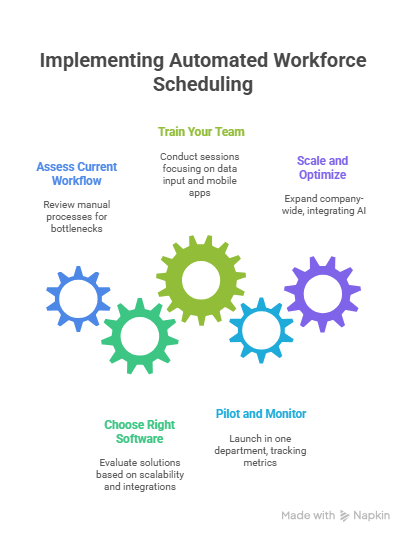
Transitioning from manual operations to automated systems requires a structured approach. Rushing implementation causes the same problems automation is meant to solve: confusion, missed appointments, and frustrated staff.
- Audit your current workflow (Week 1). Document every step of your current scheduling, dispatching, and invoicing process. Identify the specific bottlenecks where time is lost. Common findings: phone-based scheduling with no central calendar, handwritten work orders, and end-of-day invoice creation from memory.
- Select software based on your bottlenecks, not features (Week 2). Match your audit findings to software capabilities. A solo plumber who loses time on invoicing needs Jobber, not ServiceTitan. A 15-person HVAC company with routing problems needs GPS-integrated dispatching. Do not pay for features you will not use in year one.
- Migrate data before going live (Weeks 3-4). Import your customer database, service history, and pricing into the new system. Clean the data during migration. Duplicate records, missing phone numbers, and incomplete addresses cause automation to fail from day one.
- Train in stages, not all at once (Weeks 4-6). Start with scheduling only. Once the team is comfortable, add dispatching. Then invoicing. Introducing all features simultaneously overwhelms staff and increases resistance. The SBA reports that 70% of technology implementations fail due to poor change management, not bad software.
- Measure results and adjust (Month 2+). Track three metrics: average time from booking request to scheduled appointment, daily windshield time per technician, and average days from task completion to payment received. Compare to your pre-automation audit numbers. Adjust workflows based on data, not assumptions.
Common Implementation Pitfalls and How to Avoid Them
On AllBetter
Ready to get it done?
Fund escrow before work starts. Release payment when you approve the finished work.
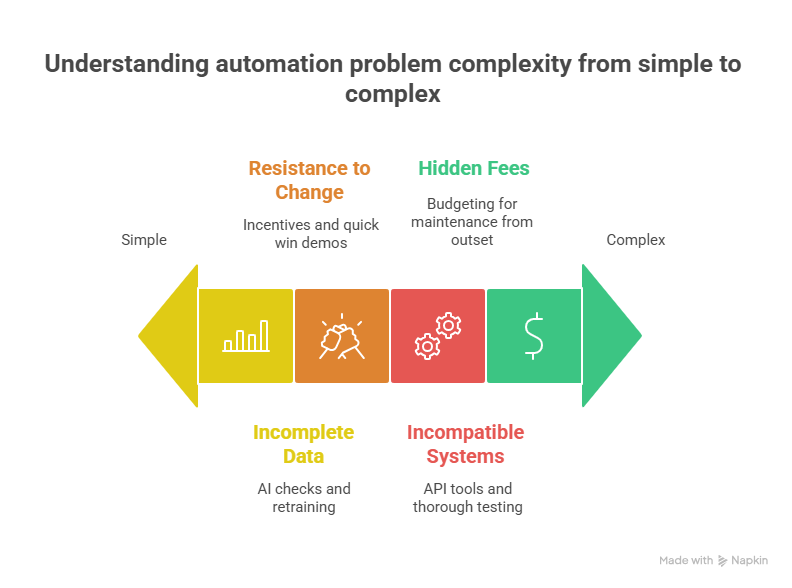
Find a verified pro near you →The most common reason automation implementations fail is not technology. It is people. Understanding the human side of the transition prevents setbacks that delay ROI by months.
- Pitfall: Employee resistance. Technicians accustomed to their own scheduling rhythm see automation as micromanagement. Solution: involve field staff in software selection. Let them test the mobile app before company-wide rollout. Show them how automation reduces their paperwork, not their autonomy.
- Pitfall: Over-automating too quickly. Attempting to automate scheduling, dispatching, invoicing, customer communication, and reporting simultaneously creates chaos. Solution: automate one process at a time. Master scheduling before adding dispatching. A phased approach builds confidence and catches configuration errors early.
- Pitfall: Ignoring data quality. Automation amplifies whatever data it receives. If your customer database has duplicate entries, wrong addresses, or missing contact information, the automated system will send technicians to wrong locations and double-book appointments. Solution: dedicate a full week to data cleanup before going live.
- Pitfall: Choosing based on price alone. The cheapest software often lacks critical features (route optimization, mobile app reliability, integration with accounting tools) that determine whether automation actually saves time. The SBA recommends evaluating total cost of ownership, including implementation time and training costs, not just the monthly subscription.
Measuring ROI: How to Know If Automation Is Working
Automation is an investment, not an expense. The difference is measurable. Track these metrics monthly to quantify your return.
| Metric | Pre-Automation Benchmark | Post-Automation Target |
|---|---|---|
| Admin hours per scheduling cycle | 15-20 hours/week | 3-5 hours/week |
| Average drive time between appointments | 35-45 minutes | 15-25 minutes |
| Days from completion to payment | 14-30 days | 0-3 days |
| Missed or double-booked appointments | 3-5 per week | 0-1 per week |
Combined annual productivity gains and cost savings for a $500K-revenue home service business after implementing workforce automation (Deloitte)
A Deloitte study on small business technology adoption found that companies implementing workforce automation see an average 22% increase in productivity and a 15% reduction in operational costs within the first year. For a home service business generating $500,000 in annual revenue, that translates to roughly $75,000-$110,000 in combined productivity gains and cost savings.
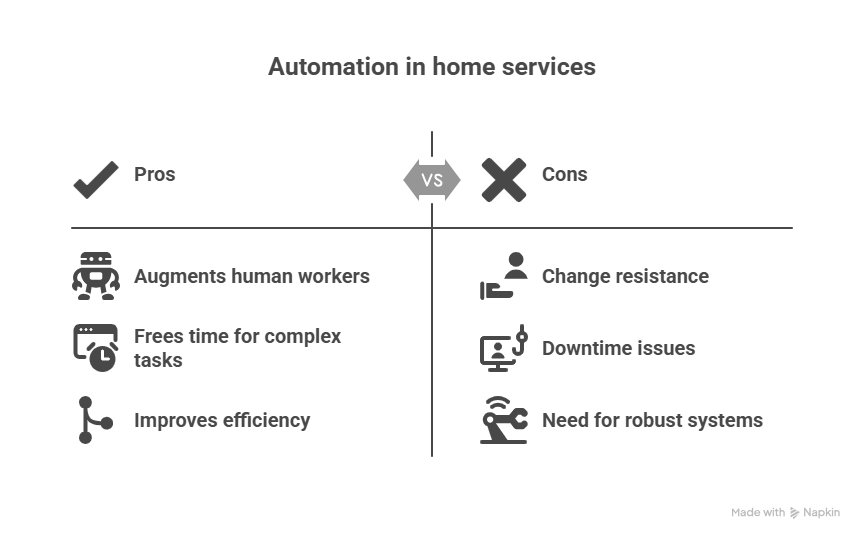
For contractors looking to grow their contracting business, automation is not optional at scale. A solo operator can manage five appointments per day manually. A five-person team cannot. The math breaks at scale without systems.
AI and the Next Phase of Workforce Automation
Current automation handles rules-based tasks: assign the nearest technician, send a reminder, generate an invoice. The next phase uses artificial intelligence for prediction and optimization.
Where AI is already delivering results
- Demand forecasting. AI analyzes historical booking data, weather patterns, and seasonal trends to predict surge periods. This allows businesses to staff appropriately for busy weeks rather than scrambling when calls spike.
- Predictive maintenance scheduling. Instead of scheduling HVAC tune-ups on a fixed calendar, AI monitors equipment performance data and triggers service calls when efficiency metrics indicate an approaching failure.
- Dynamic pricing optimization. AI adjusts pricing recommendations based on demand, competitor rates, and service complexity. This helps contractors maximize revenue without manual market research.
- Customer communication automation. AI chatbots handle booking confirmations, rescheduling requests, and post-service follow-ups, freeing office staff for complex customer interactions. For guidance on effective client communication strategies, see our dedicated guide.
These capabilities are available today in enterprise platforms like ServiceTitan. Mid-market tools like Housecall Pro and Jobber are adding AI features progressively. Contractors who want to explore AI-enabled tools can compare options in our guide to apps for contractors.
Ready to Automate Your Field Operations?
AllBetter Field gives contractors quotes, jobs, invoicing and client management starting at $29/month, with scheduling and dispatching on Pro and up. The separate JobPro app adds homeowner jobs with escrow payment protection. Stop losing 20 hours a week to manual admin.
Cut acquisition cost to zero — keep that margin
| Feature | Angi / Thumbtack / HomeAdvisor | AllBetter |
|---|---|---|
| Pro Identity Verified | Self-attested, no verification | Stripe Identity verification on every pro |
| Lead Fees to Pros | $15–$80 per lead (passed back to homeowner) | only pay when you win — ever |
| Payment Protection | None — you pay direct, hope for the best | Escrow Shield — you only release payment when work is approved |
| Pro Quality Filter | Anyone can sign up; reviews come later | ID-verified pros, average 3+ bids per job |
| Spam & Auto-Calls | Your phone rings for days after one inquiry | Zero spam — pros message in-platform |
Lead-fee context: average lead-gen spend at small contractors runs 8-15% of revenue — AllBetter is $0.
Trying to scale on rented platforms with $50-$110 lead fees means revenue grows but margin stays flat — you’re feeding the platform, not the business. The safer move is to see AllBetter business software — you get ID-verified bids in minutes, no obligation.
Your money sits in escrow and is released only when you approve the work.
Frequently Asked Questions
How much does workforce automation software cost for a small home service business?
Entry-level platforms start at $29-$69 per month for a single user. Mid-tier solutions with GPS routing and automated invoicing run $79-$200 per month. Enterprise systems like ServiceTitan typically cost $200-$500 per user per month with custom pricing. Most platforms offer free trials of 14-30 days. Start with the tier that addresses your biggest bottleneck, and upgrade only when you outgrow it.
Will automation replace field service technicians?
No. Automation replaces administrative tasks: scheduling, dispatching, invoicing, and reporting. Physical repair work, diagnostic assessment, customer interaction, and skilled craftsmanship require human expertise. What automation does is allow each technician to handle more appointments per day by reducing windshield time, eliminating paperwork, and preventing scheduling conflicts.
How long does it take to see ROI from workforce automation?
Most businesses report measurable productivity improvements within 60-90 days of full implementation. Deloitte data suggests a 22% average productivity increase within the first year. The critical variable is implementation quality. Companies that rush deployment without data cleanup and staff training take 6-12 months longer to see returns.
What is the biggest mistake companies make when implementing automation?
Trying to automate everything at once. The most successful implementations follow a phased approach: scheduling first, then dispatching, then invoicing. Each phase allows staff to build confidence with the system before adding complexity. The second most common mistake is poor data quality. Duplicate customer records and incomplete addresses cause the automated system to generate errors that erode team trust in the technology.
Can a solo contractor benefit from automation, or is it only for larger teams?
Solo contractors benefit significantly, particularly from automated invoicing and customer communication. Sending invoices the moment a task is marked complete instead of batching them at the end of the week accelerates cash flow by 10-20 days. Online booking eliminates phone tag with customers. Even basic scheduling software prevents the double-bookings that cost solo operators $150-$300 per missed appointment.
How does dispatch optimization software reduce costs?
Dispatch optimization uses GPS data and real-time traffic information to assign the nearest qualified technician to each service call. This reduces average drive time between appointments by 30-40%, according to IFMA research. For a five-technician team, that translates to 2-3 additional billable appointments per day across the team, which at $150-$250 per appointment equals $300-$750 in recovered daily revenue.
What compliance and safety benefits does workforce automation provide?
Automated systems track working hours to ensure compliance with overtime regulations and rest period requirements enforced by the U.S. Department of Labor. Digital checklists ensure technicians complete safety protocols before starting work. GPS tracking provides proof of service for warranty and liability purposes. For businesses operating across state lines, automated compliance tracking prevents the fines that come with inconsistent labor law adherence.